
Graphic recording for strategic planning: techniques for success
A new guide
This guide from Drawing Change offers graphic recorders strategies to enhance their role, such as interpreting sparse agendas, expanding techniques, and recognizing different meeting dynamics. IFVP members can access this as a 60 minute video keynote on the members-only section of the website.
Strategic planning + graphic recording: it isn’t a regular meeting
Graphic recording adds tremendous value to strategic planning. Visualizing a group’s mission, vision, and goals in real-time helps capture the energy of the process. When graphic recorders are in sync with a strategic planning agenda – we are invaluable, trusted, and a “we can’t have this meeting without you!” partner in the room. However, graphic recording in strategic planning has unique challenges. It’s not a regular meeting or presentation.

Because each meeting is unique, the graphic recording approach should also change. If your graphic recordings (or the ones by the person you’re hiring) always look the same, it may be time to adjust your techniques. Clients may also expect a perfect drawing, but the goal is to support collaboration and decision-making, not to create a flawless image. Understanding the agenda, especially if it’s vague or lacking context, is another key challenge. Or, the missed opportunity to leverage your broad skillset beyond being invited to just one meeting out of a longer engagement. With all of these challenges and more, the goal is preparation.
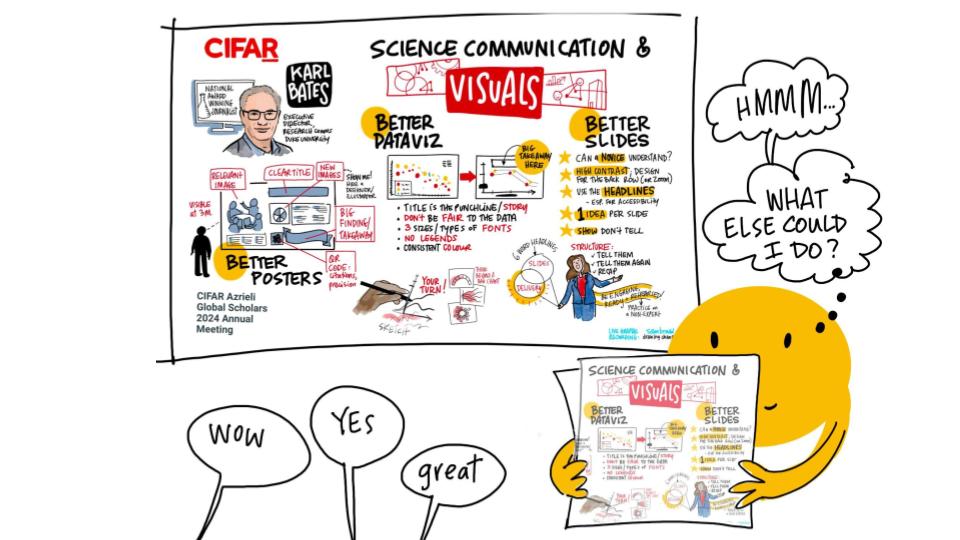
If you’re ready to stretch and see what a broader role for graphic recording in strategic planning can look like, this guide is for you. This guides provides concrete steps for graphic recorders to add value for strategic planning, including:
- How to interpret an unclear agenda
- Expanding your techniques as a graphic recorder
- Recognizing different shapes of strategic planning meetings
- Strategizing how to make the best impact when you’re only invited for a small part of a longer planning process
- Asking great strategic questions,
- and more!
Section 1: Shapes of Meetings
These are examples of common graphic recording settings:

Strategic planning + graphic recording isn’t a regular meeting
When you’re in a meeting where people are talking in groups, the role of the graphic recorder is often to listen, collaborate and document the conversation. But it’s different when a group is making a decision or needs to get aligned on a specific path.
Strategic planning is about prioritization – focusing energy on alignment and making decisions the whole group can get behind. We want to:
- Determine with the client what parts of the meeting are for brainstorming or decisions
- Understand how to capture decisions and in how much detail.
- Be able to make wise choices about what we record (without rushing in too far, or, waiting too late)

Dialogue and the Diamond of Participation
Graphic recorders need to have tools that allow for complexity, and when emergence shows up. In these cases, the diamond of participation comes into play. This is from Sam Kaner et al.’s Facilitator’s Guide to Participatory Decision Making. Get familiar with looking for the “diamond of participation”. You can spot it in your dinner-making plans and in your meetings, when things are shifting between question-asking and making decisions. Look for tendencies and patterns around decision making and power, and explore what your own biases might be in different situations.
Let’s say a group is deciding “where should we go for dinner?”. Some people want pizza, and others want sushi. There’s idea sharing, and people asking questions. These are ‘divergent’ moments. The divergent process helps people to learn about one another, share information, discover things they weren’t aware of, and go deeper on their brainstorming.
Then, someone might make a proposal, “The people who want pizza should come with me, and the folks who want sushi should head there and after and we meet up later for karaoke.” Oops, they’ve jumped into decision-making … but making the decision for everyone. Generally a strong group decision involves multiple perspectives, clarifies a proposal or idea, and gets buy-in, before making a final decision.
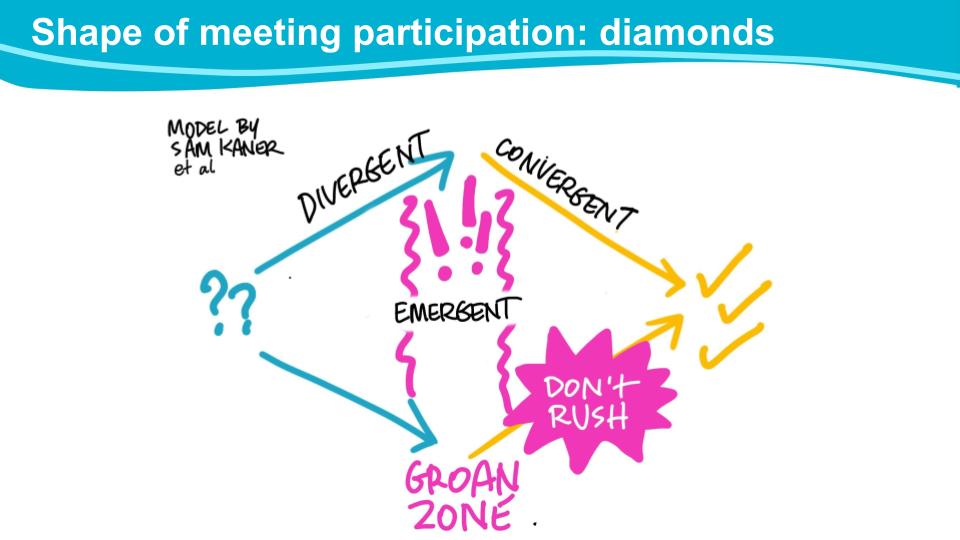
“I can’t believe we haven’t decided where to go for dinner yet.” This is the Groan Zone – between brainstorming and decisions, things always become unclear. Expect a ripple of frustration at some point, and try to stay flexible in that emergent zone whenever it happens. When you know that there always will be a Groan Zone, it feels less stressful. As a graphic recorder, work with care that you’re not only drawing out the first answer, or jumping to conclusions when the group hits the Groan Zone. The loudest voice in the room shouldn’t dominate the discussion, or your graphic recording, just because they’re first!
Aligning the graphic recording to the desired outcomes
In graphic recording, we want to prioritize the process. The graphic recording visuals should match the process (either described in the agenda or what’s really happening in the room), to help the group reach their outcomes.
Before a strategic planning session, a graphic recorder collaborates with the client to make sure we’re on the same page – we don’t have to figure this out alone. For example, you can ask if parts of the discussion should go on a flip chart separately? or, should you capture every idea in specific sections or just the top priorities? Or, will there be ranking, and you should leave space for the decisions.
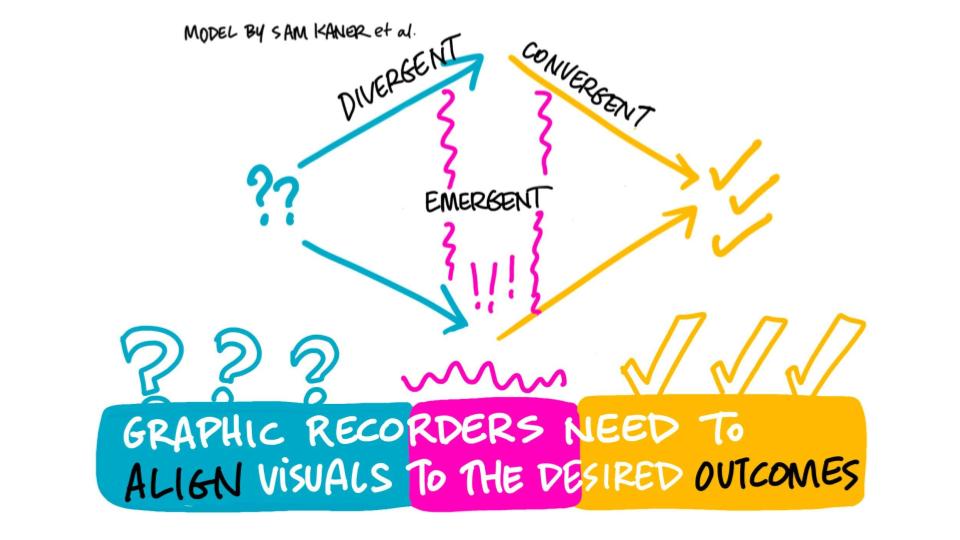
How to best gather the knowledge in the room? What’s the graphic recording ‘harvest?”
Ask yourself, how should I best set up this harvest? A harvest is how you’ll gather the knowledge in the room. Imagine you’re a farmer but you’re harvesting data and insights. For this meeting, should the visuals be a balance of 50/50 for brainstorming and decisions? Or, is there a conscious choice to weight the poster toward blue, the brainstorming part, to allow for more questions and discussion? Alternatively, you might save more room for the decisions, because that’s more important in this session. What parts need typed notes, and where do we need something where the graphic recording should be prominent.


Plan for next steps
Most meeting agendas will have a section for ‘next steps’, but you may not have any visibility into what those next steps entail. In terms of your drawing, you’ll need to leave enough space so that the next steps aren’t an afterthought, squished into the corner of the page. The key is to not run out of space on your page! This preparation is on the page, but also in your communication with the facilitation team. It can look like magic – last week someone asked me and my co-facilitator, “do you two share a brain?” because our facilitation flow looked seamless, even though we hadn’t teamed up before, but it’s all about the preparation. Preparation helps us stay focussed on the process – to help people learn and collaborate effectively.
Support the process, not perfection. Or choose perfect, later
There’s a two-way trap with pretending anything can be perfect!
Trap #1 is if a graphic recorder comes in with a pre-drawn, almost fully-completed drawing before the meeting starts that looks ‘perfect’. It can be hard to even make suggestions when something looks too nice! This isn’t the best way to leave space for emergence, major changes in the agenda, or if the metaphor isn’t the right one.
Trap #2 is if the graphic recorder over-promises what the final product at the end of the day can be. When a large organization wants a visual Strategy On A Page (often called a SOAP), what’s highly realistic is that often there will be a need for edits after the session. Refinements to text, input from other decision-makers, alignment with branding and more. Instead, recommend a Phase #2 for this project – Phase #1 with live graphic recording, then Phase #2 to redraw the Visual Strategic Plan with edits after.

Examples
This graphic recording was drawn live as part of a three-hour meeting:

Here’s how the divergent and convergent parts played out. Divergent role: graphic recorder records more details in bulleted lists, and provides value by sorting the information into themes (in green). Convergent role: graphic recording summarizing top eight ideas.

In this case, the group was new to this conversation, and nuances were very important to capture. When the groups came back together after breakout work, they had a final question, and this is where the drawing shifted to summarizing.
The left side is very listy and detailed, while the right is more fun. This was developed in collaboration with the organizers. But how will you know how to approach your drawing? You can ask!

Takeaways
- Know the diamond of participation. Anticipate and respond wisely when the group shifts between divergence, emergence and convergence, so you can visualize what’s being called for
- Choose different layouts for a strategic planning session, based on whether you need more details or more summary
- Keep communication open: Before and during the session, it’s important to keep the communication open between the graphic recorder and the facilitators in the room.
Section 2: Layouts for strategic planning and graphic recording
Strategic planning asks,
- Who are we?
- Where are we now?
- Where do we want to go?
- How are we getting there?
The graphic recording images can reflect that journey too – if you can include the right balance of what happens in the meeting, which might include group work, panels, speakers, presentations and more. But how will you know if you’re making wise choices? First, build up your skills to demystify the agenda. Then it’s important to collaborate with the client. You’ll also need to be ready for the possibility that the plans could change completely!

Try Colour Blocking
Try colour blocking to plan out space for all of the required components.

Option A: Organize the poster by morning/afternoon
I usually draw multiple posters during one day of graphic recording. However, there are definitely great reasons to draw one poster per day. In this example, you’ve chosen to draw one poster for the day.

Option A: Split up the day equally by morning and afternoon, regardless of the agenda. Draw the morning on the left hand side, and the afternoon on the right hand side of the poster.
There can be many advantages when a client wants one poster to summarize an entire day. This means you’ll get to draw more slowly and will have more time. You can really ‘show, not tell’. This can give you more time to have anchor images, to draw things in detail and produce a more complex illustration or beautiful lettering, or to zoom in on one section.
Option B: Multiple posters, one section with more detail
Option B is about multiple posters, and the most important section is bigger. This provides the ability to have more detail.

In Option B, you and the client identify what is the most important section. Here the most important section is the green part. Because the group work section for this meeting is the most important, it gets more space.
With strategic planning the content is crucial – sometimes you get one chance to get a big divergent brainstorm onto the page, so having more room to write is important.
One other tip is to put a separate flip chart near your graphic recording as place to hold more details that don’t make it into your graphic recording, for whatever reason.
Option C: One poster, and prioritizing one part of the agenda
Option C: This option prioritizes one part of the agenda, de-emphasizes the rest, and the graphic recorder, meeting facilitator and client agree on this choice ahead of time.

The main idea here is to think about the whole day and where you need to put the overall emphasis. And the way to figure this out in advance is to ask great questions to the client and meeting facilitator.
With some types of planning – like community engagement – there could be 100 people in the room. There may be lots of group work, or lots of powerpoints, and it’s quite complex. You can only graphic record so much content in one day! So being able to determine the most important section of the meeting can help you manage your brainpower, energy, and make the visuals really clear for the room. You want to ensure the emphasis is in the right spot, so major decisions aren’t squished into a corner or missed completely.
In this example, the emphasis is the priority setting in purple. The details happening in the green section are going to be captured by note-takers with computers, and the graphic recording only needs to get 2-3 major ideas. The joint decision is that the green section gets smaller, the yellow section gets smaller, and that purple section gets a lot bigger.
Complex Systems Frameworks
You don’t always have to start from scratch with your drawing. There are frameworks and models you can draw on. This is a new, free collection of complex systems frameworks that I illustrated – it’s a collaboration with Dr Diane Finegood.

Complex Systems Framework Collection
This collection includes 40 models grouped into categories and illustrated. If you’re already familiar with complex systems thinking, you’ll recognize many of these strategies. But if you’re new to it, you’ll see graphic recorders can support complex content, using some of these principles.
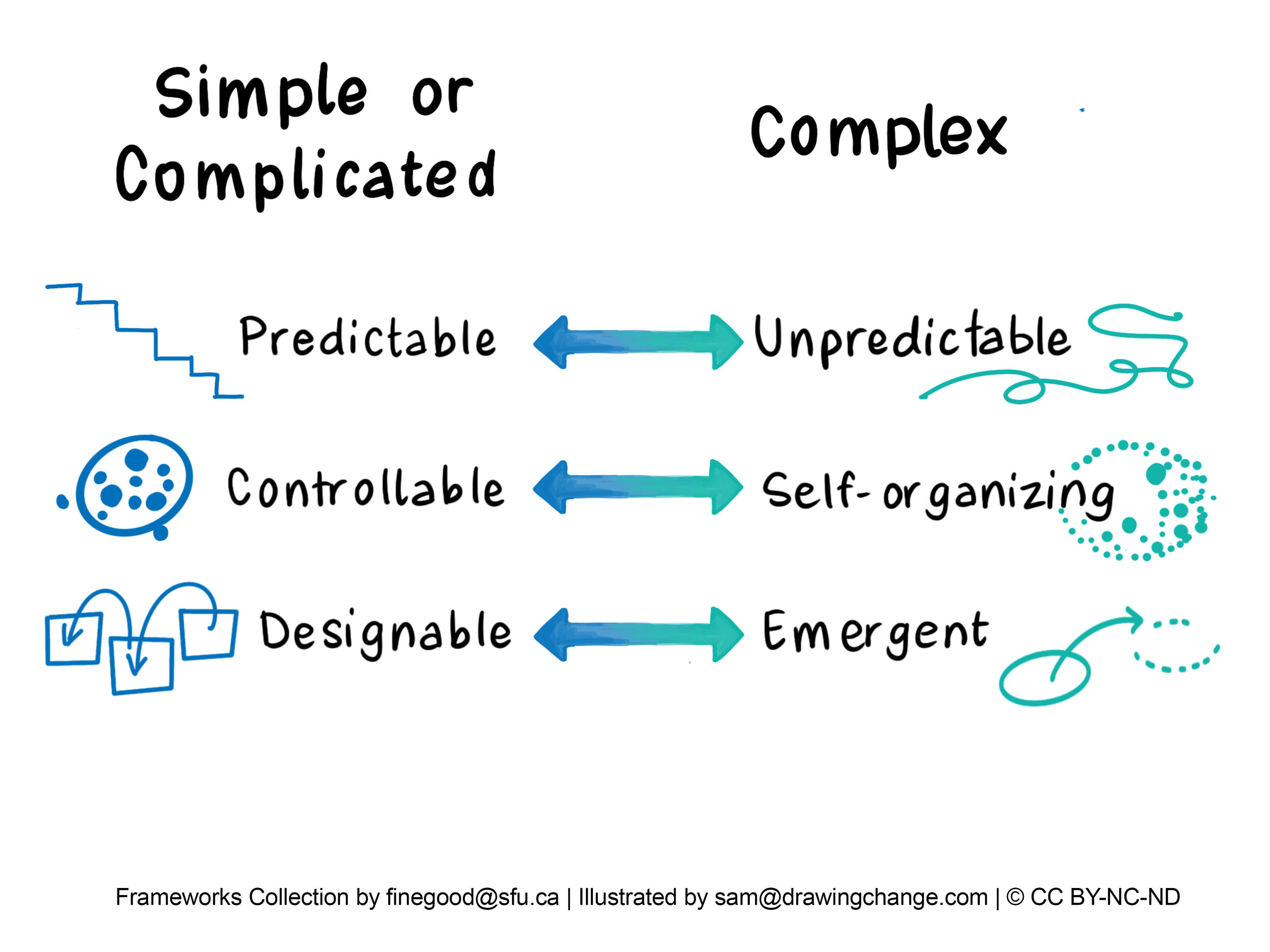
Here’s an example from the ‘complexity’ category. Notice the shape of the lines – when groups are strategic planning, there are always moments when things are never as clear-cut, rigid or fixed when you’re figuring things out. Graphic recording isn’t going to get replaced by robotic AI anytime soon, and strategic planning isn’t as easy as putting things into boxes. So visually, it’s useful to think about how graphic recording imagery can hold space for complexity in the lines, drawings, and metaphors.
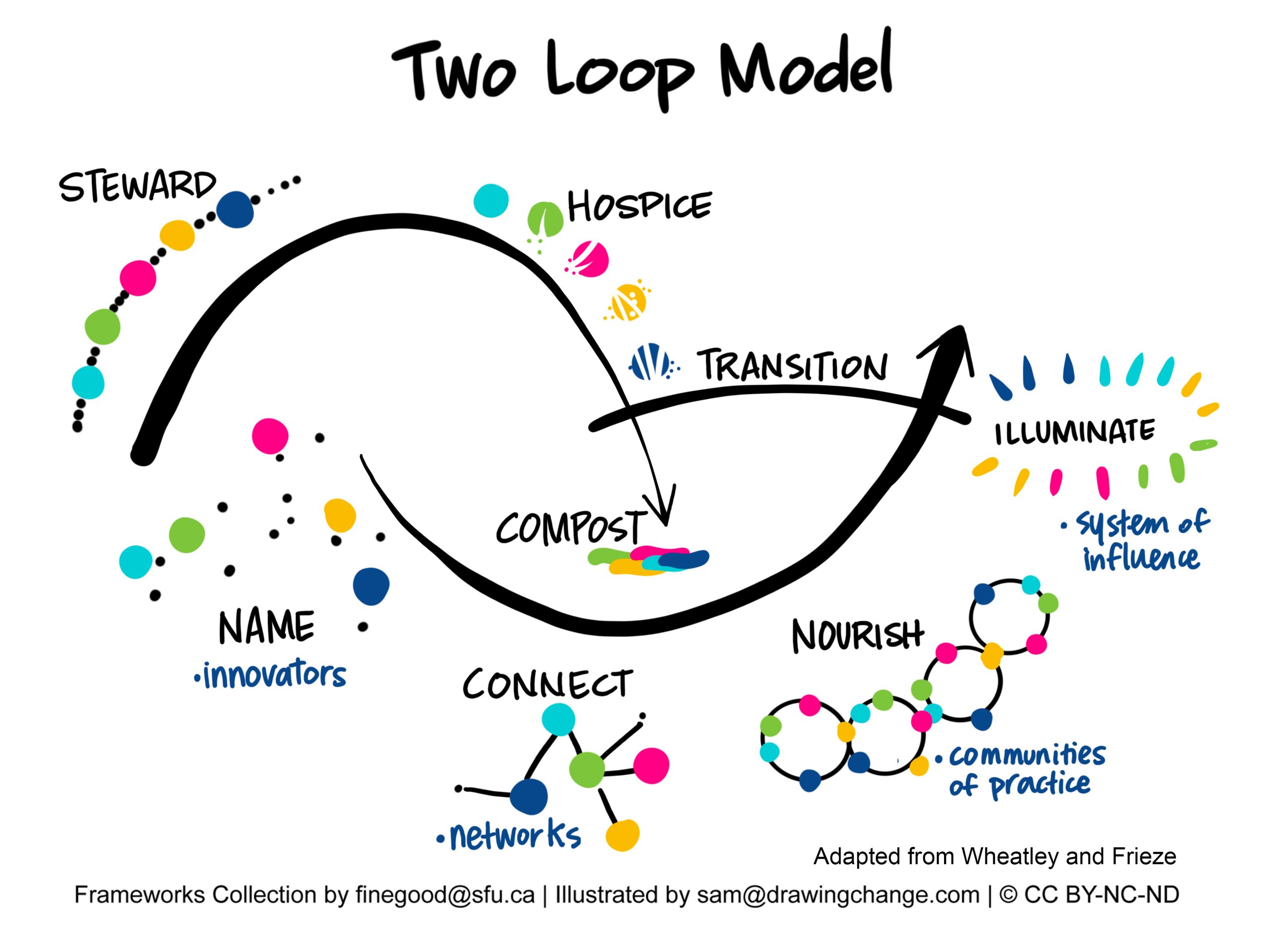
Consider using models that are accessible to you and recognizable at a glance, so you can integrate them during live graphic recording sessions.
Iceberg model and strategic planning
People are often familiar with icebergs, and these can be powerful for many scenarios – usually it’s to teach or explain something, or map out what is visible and what is invisible.

The example on the right was a live graphic recording with a 20-minute report-out, and you can see how the iceberg organizes the content much more clearly than using a list, or random boxes. The information in the iceberg becomes the container for explaining what the report-out.
Feedback Loop Model
The tool in the top left is a feedback loop. The example is a live graphic recording – 90% of it was drawn live in real time, except for the people.

Help it Happen model
In the example above, the tool in the top left is called ‘help it happen’. This was a studio illustration (not drawn live), and visualizes an example of moving away from rigid structures into ways of working that are more adaptable. The model shows the place of emergence, but with supports.

PATH: Planning Alternative Futures with Hope
This model, above, called: PATH: Planning Alternative Futures with Hope, is a well-known positive planning tool (this isn’t part of the SFU collection). With the PATH, you begin on the right hand side with the North Star. Then you work back to the centre, and then back to the left-hand side.

It reflects a strengths-based approach, and it can be used for individual planning or to help structure an entire engagement with many stakeholders/ community members/ people.

This is the vision for School District 58 in BC. Almost all of this was drawn live, except the text in the big arrow which was refined afterwards. Using PATH helped to identify the North Star – and then next steps!
Takeaways
- Plan ahead with colour blocking. Strategize and sketch out your approach for each unique strategic planning session, and ask the client for what they need
- Collect models: Have five or six frameworks you can rely on as a graphic recorder. They don’t have to be complicated.
- And, know your tools: Have some go-to fonts and lettering styles to keep things simple.
Section 3: Asking Great Questions
The graphic recorder might have very logical and crucial questions like ‘where am I going to set up’, and ‘is the drawing going to be digital or on paper?’ ‘What time can I log in’, and ‘is there a tech host in the room’?
But all of these questions come later, because the client’s perspective is about the strategic planning, and it’s really their four questions that are most important:
- Who are we?
- Where are we now?
- Where do we want to go?
- How are we getting there?
You’ll be a stronger graphic recording partner in the room if you can start in the strategy zone with your questions. Ask about the big ‘why’ for the meeting: what’s meaningful to the client, what challenges are they facing. These are all about the purpose of the session, and then the outcome section is about the agenda and their goals for what’s going to happen as a result.

This tool (below) is called POP, which stands for purpose, outcomes, process. I use this tool from Rockwood Institute for everything – writing emails, figuring out what I need to say before a phone call, agenda planning, and calls with clients. Here’s the POP and why it applies to strategic planning for graphic recorders.
Specific questions about Purpose
- What’s the Big Why for this meeting?
- What’s meaningful to you about this particular gathering?
- What’s happening around you/this context that demands change?
- What does success look like for your organization – or meeting?
- What challenges or wicked questions are you facing?
Specific questions about Outcomes
- What parts of the agenda are the most crucial?
- At the end of the session, what would you see in the visuals that would make them a success for you?
- What’s the first / next step, and how could the visuals show you’re making progress?
- How do you hope we can use the images in the room – what engagement can we incorporate?
- After the meeting – how could the graphics support your follow-up plans?
This is not meant to be a list you bring to a meeting. This is just a start, but the idea is to separate the purpose, outcomes and process.
Tip: Don’t interview the client intensely with all of these! Just stay curious! Look to great resources for more question-asking via Appreciative Inquiry resources, coaching websites, or the classic resource The Art of Powerful Questions.

Then, be ready to switch to questions about process – and where you can bring your expertise and recommendations.
Example: Client Journey Mapping
Example of recommending a process for how to harvest a full day Journey Mapping session about crisis lines. We wanted to find out about caller experiences before, during and after.

We recommended this process for the graphic recording/ client journey mapping.
- Individual writing first. Clients would reflect individually on post it notes about how they felt before calling the crisis line, and their emotional state during and after. They wrote these short phrases on post it notes and put them on the wall. This was a lower-risk entry into the conversation, and the graphic recorder could then read the post it notes and summarize the emotions onto the poster ‘journey’.
- Small group work came next, about “before the calls to the crisis line”. There was small group work, and a share back to the full room. This was a safer way of building trust in the room between participants, and also gave the graphic recorder time to hear from each small group.
- Full group discussion was the majority of the session. The participants had a dialogue about their experiences “during calls to the crisis line” and “after the call to the crisis line”. The graphic recorder followed the themes and drew in real time.
- Then, we recommended building in time to review the graphics with the people right there, and make adjustments.
Example: Group Work / Breakout Groups during Graphic Recording
This is a handout that I give to group facilitators, especially people leading small group breakouts.

Specific Questions about Process
What parts of the agenda should be captured in detail? | Make a plan for how you’ll capture details, should some be on post it notes separately or everything in the graphic recording? |
For the group work, what’s worked well in the past for harvesting the notes? | Make recommendations here: do you want to walk around, or, will there be a report out, or, do you want key summaries from each table or another process? |
Are there other note-takers? | Clarify roles and responsibilities in the room with other facilitators. It’s great to have a team to make sure nothing gets missed! |
What would make a difference with these graphics, afterwards? | What’s the plan for the graphics during the session and afterwards? For example, if you have a social media plan, you can draw them in easy to crop ways; if there’s a plan for translation then draw text next to images; suggest a gallery walk during the meeting to encourage engagement |
What sizes and formats do you need? | You can’t make things bigger after – get the right sizes from the start |
Are there online participants? | Address tech needs and provide the online participants a great experience too |
Would this project benefit from a more polished, refined version of a visual strategic plan on a page, later? | Discuss a followup process for the graphics. Could an internal team create a one-page visual strategic plan? or, could this be a second project that you could support the group with? |
Takeaways
- Remember the POP: Ask strategic questions about the meeting’s purpose and outcomes. Then make great recommendations to support the process . This puts the clients’ needs before your own
- Make recommendations t hat support the graphic recording process: recommend a way to manage group work and share backs; recommend how to approach extra large rooms or where there isn’t full group plenary discussions; recommend extra time or a way to balance the amount of detail required with what is humanly possible; and a best practice is to build in time for the graphic recorder to present the visuals and either get validation or adjustments from participants
- Planning calls are a two-way conversation: bring your list of questions, but remember – you’re not there to interrogate the client like it’s a test! Just stay open and curious!
- And if the client insists on a product that looks ‘perfect’ – recommend a process where the graphic recording role during the meeting supports the participants, and then afterwards the graphic is redrawn to get it ‘just right’.
Conclusion
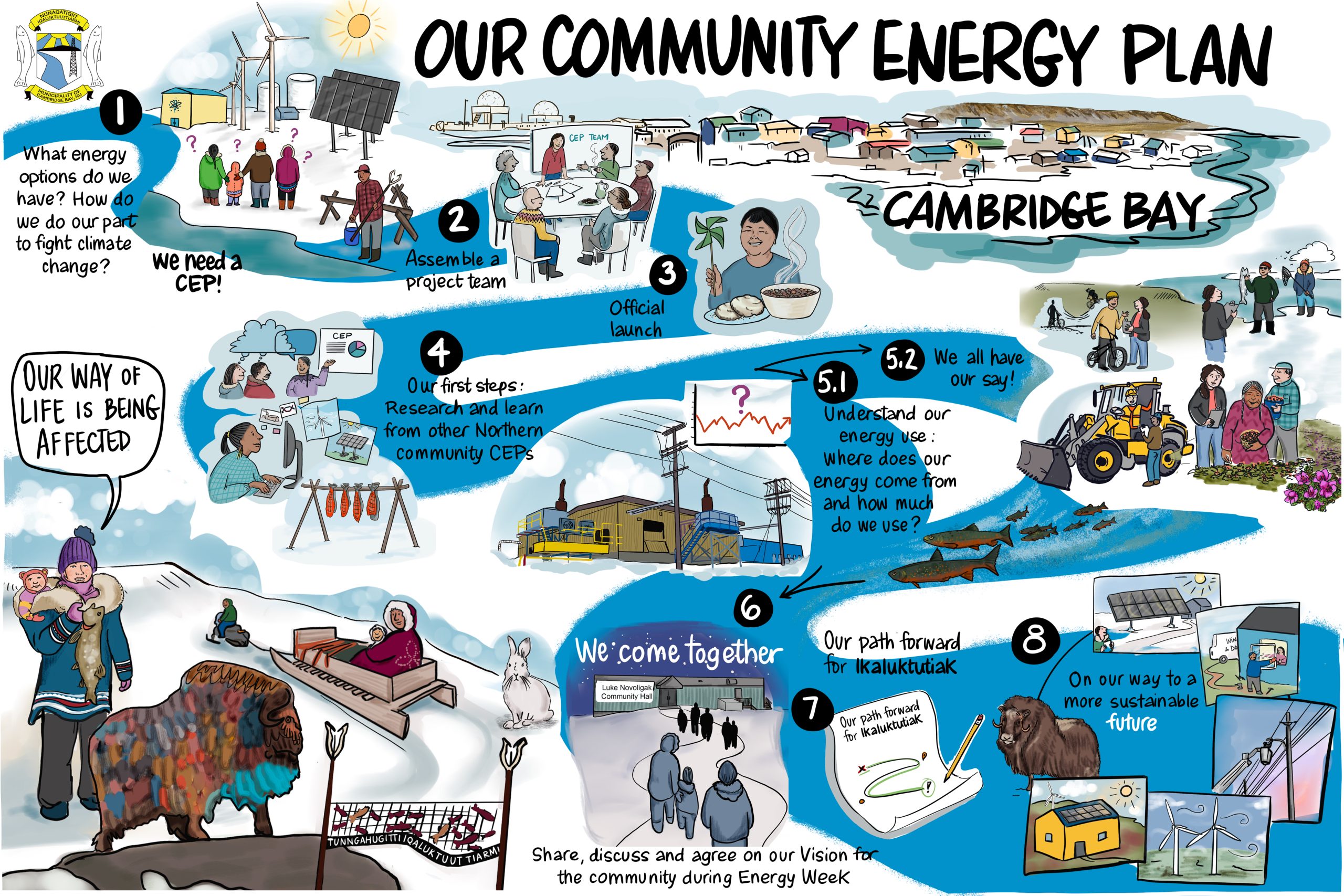
Graphic recording adds tremendous value to strategic planning. Visualizing a group’s mission, vision, and goals in real-time supports collaboration and decision-making. It’s also a fun way to engage people who may not typically enjoy strategic planning (as much as consultants do), involving them in the process. Graphic recording ensuring that all perspectives are captured and nothing is overlooked. However, there are challenges: graphics should be tailored to the specific session, not just repeated from previous ones.
Even when faced with a sparse agenda, graphic recorders can use many strategies to enhance their role, and meet the group’s needs. In summary, this guide suggests three tools to get started:
- Understanding the “Diamond of Participation,” which refers to shifts between brainstorming (divergent thinking), decision-making (convergent thinking), and the “Groan Zone” when confusion or frustration arises. The recorder’s job is to capture the process without rushing to conclusions, especially when decisions are being made.
- Graphic recording must align with the meeting process, outcomes and process, so preparation is crucial. This includes collaborating with the client beforehand to understand priorities, deciding how much space to allocate to brainstorming versus decision-making, and leaving room for next steps in the visual summary. Tools like color blocking, multiple posters, and frameworks (e.g., using models like the iceberg or a feedback loop) help organize complex content.
- The graphic recorder should ask strategic questions to understand the purpose, desired outcomes, and process of the session.
By preparing thoughtfully, asking the right questions, and staying flexible, graphic recorders can create visuals that not only document but also inspire and guide the group through the strategic planning process.